A buyer likes your saree photo. Then they ask, “Will the border look the same when it arrives?”
That is the question good AI saree photography must help you answer. A pretty model and a clean background are useful. But the photo must also show the product you sell.
If you are planning your 2027 collection, use this guide before sharing new images. It is for saree wholesalers, boutiques and online sellers across India, including Surat.
Textile Magic AI is a visual creation platform for textile sellers. This guide explains how to review your images, with a practical example you can use for your own collection.
Quick answer: What should sellers check?
Before publishing AI saree photos, compare seven details with the real saree: colour, border, pallu, blouse, fabric texture, drape and consistency across poses. Keep your original photos open beside the generated image. If an important product detail changes, correct the input or replace the output before showing it to buyers.
What is AI saree photography?
AI saree photography uses software to create model-worn images from reference photos. It helps sellers show how a saree may look when draped on a person.
The Textile Magic AI saree catalogue generator uses saree photos and a chosen model photo. You can also add blouse, border and background references.
These images are product visuals. They cannot prove the fabric's weight, feel or quality. Keep real fabric close-ups and clear product details in your listing.
Which seven details matter in AI saree photography?
1. Does the colour match your real saree?
Compare the main fabric colour, border colour and blouse colour with your original photos. A deep green saree should not become teal, and a cream base should not turn bright white.
Start with clear input photos taken in even light. Avoid colour filters. Shopify's product photography guide explains how lighting and white balance affect product photos.
Open the reference and output on the same screen. Compare areas outside bright highlights and deep shadows. Screens and lighting can still change how a colour appears, so keep a real product photo alongside the model image.
Check: Are the colour changes caused by light, or has the product itself changed?
2. Is the border design still correct?
Look at the border's width, colour and repeated shapes. Check both the lower edge near the feet and the border running across the shoulder.
A thin gold border should not become a wide decorated strip. Leaves should not turn into flowers. Missing lines matter too, especially when a buyer chooses a saree for its border.
Zoom into the original and generated images. Compare one clear section at a similar size. Add a sharp border close-up if the input does not show enough detail.
Check: Can you point to the same lines and shapes in both images?
3. Is the pallu showing the right pattern?
The pallu is the loose, decorated end of the saree. Check its colour, large designs, edge and tassels against the real product.
Folds can hide part of a design. That is different from changing the design. Look for clear areas where the pattern can be compared.
Include a view that shows the pallu without hands, hair or props covering it. For your input, arrange the saree so its main body and pallu are easy to tell apart.
Check: Does the visible pallu belong to this saree, or does it look like another design?
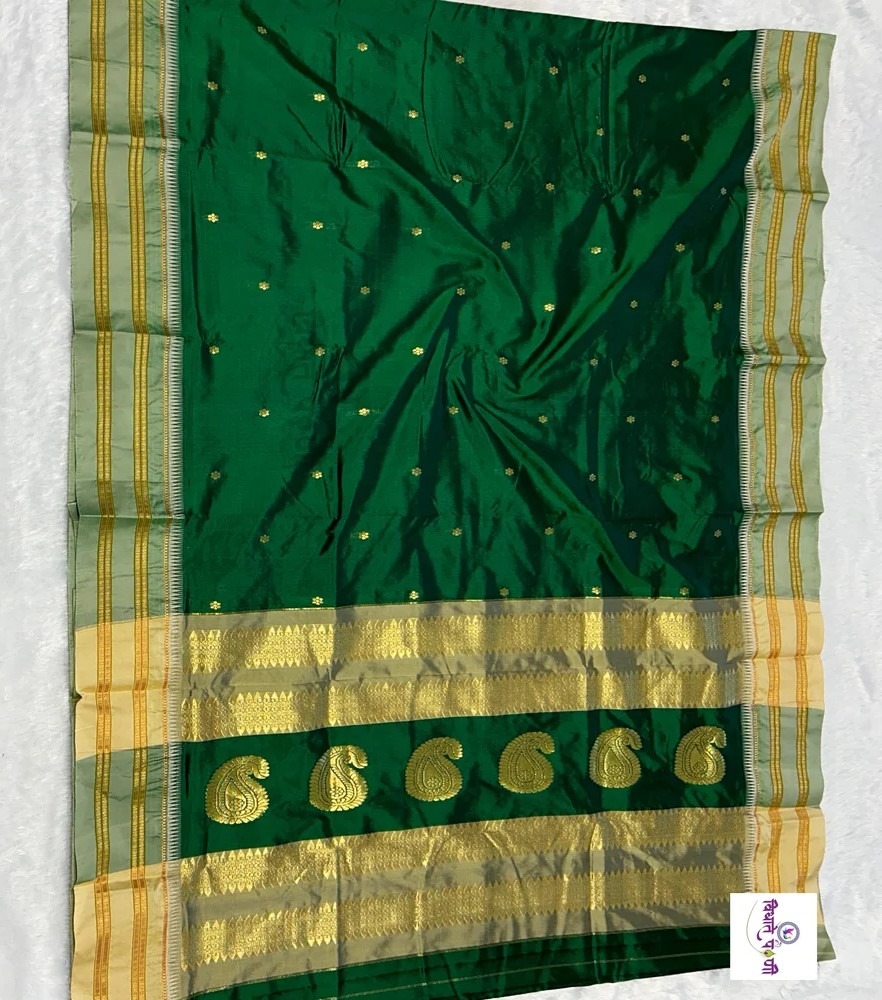
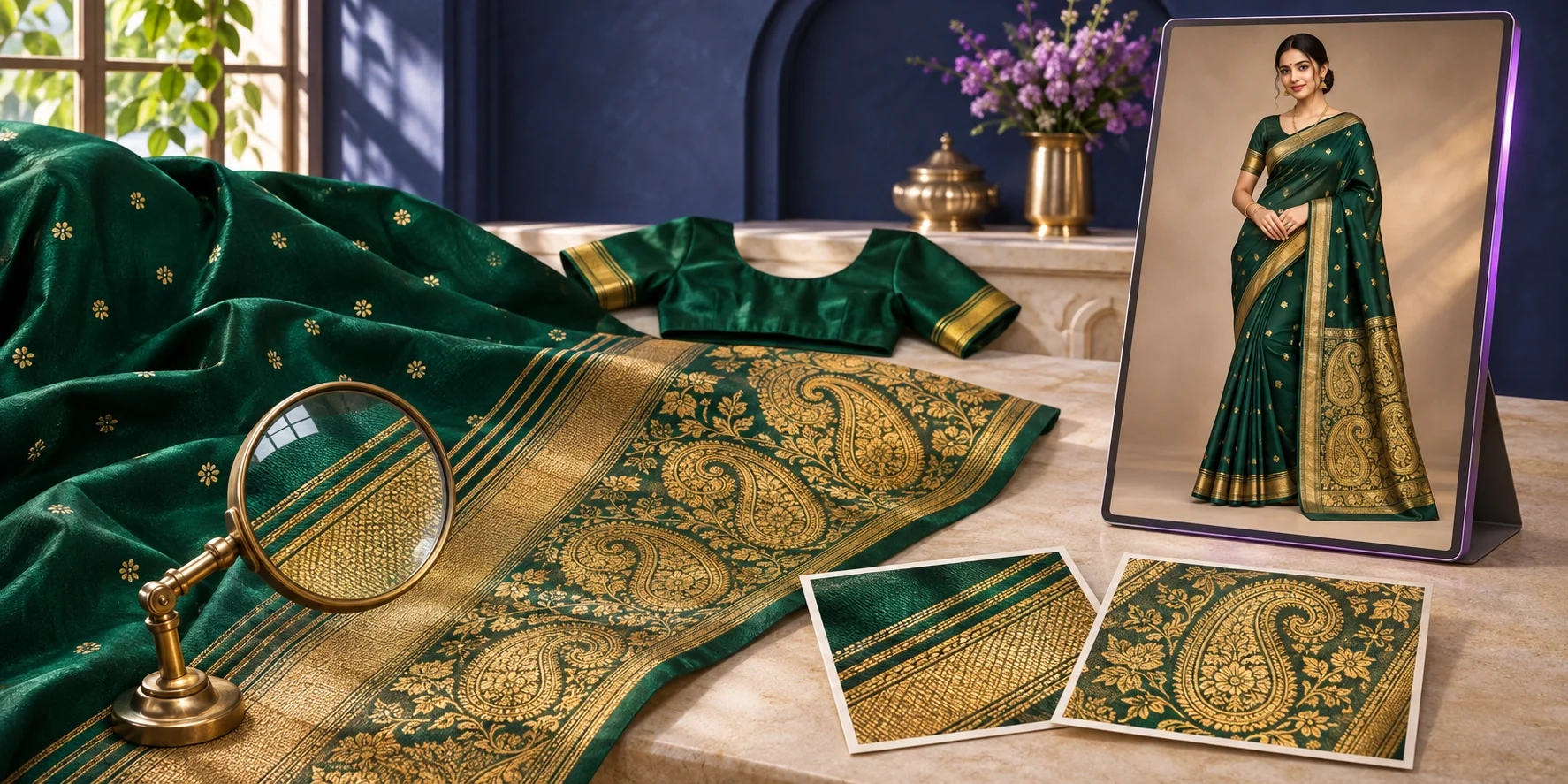
Reference example from Textile Magic AI's guide: the body, borders and pallu are visible.
4. Does the blouse match what you offer?
Check the neckline, sleeve length, sleeve border and back design. A generated blouse should not add embroidery or a cut that your product does not include.
There is another detail sellers can miss: some sarees come with an unstitched blouse piece, while the model wears a stitched blouse for styling.
State that clearly in the description. Buyers should understand whether they receive a blouse piece, a stitched blouse or the saree alone.
Use front and back blouse references when the finished design matters.
Check: Does the photo suggest that buyers receive something extra?
5. Does the fabric still look like the same fabric?
Look at the surface, shine, thickness and see-through areas. Cotton should not suddenly look like glossy satin. A sheer fabric should not look heavy and fully opaque.
Check small designs on the saree body. Are they blurred, enlarged or replaced? Do shiny zari areas still show detail? Zari is decorative metallic thread work.
Use a real close-up to show the weave. Avoid describing softness or fabric quality based only on a generated picture.
Check: Would this photo give a buyer the wrong idea about the material?
6. Do the pleats and drape look natural?
Follow the fabric from the waist to the floor and from the shoulder to the pallu. Pleats should make sense as connected folds.
Look for edges that disappear, cloth that merges into a hand, or patterns that stretch strangely around the waist.
Draping can vary between poses. That is normal. What matters is whether the cloth still looks possible and the main product details remain visible.
Choose a simple front view before adding more movement. It gives you an easier image to inspect.
Check: Can you follow where each visible section of fabric goes?
7. Is the same saree shown in every pose?
Place your chosen images next to each other. Check the colour, border, blouse and repeated designs across the whole set.
Also check the model, jewellery and background if you want a consistent collection. A buyer should be able to move between photos without wondering whether they are viewing another product.
Give every approved image the same product code. Keep rejected images in a separate folder so they do not get uploaded by mistake.
Check: Do all the photos clearly belong to one product listing?
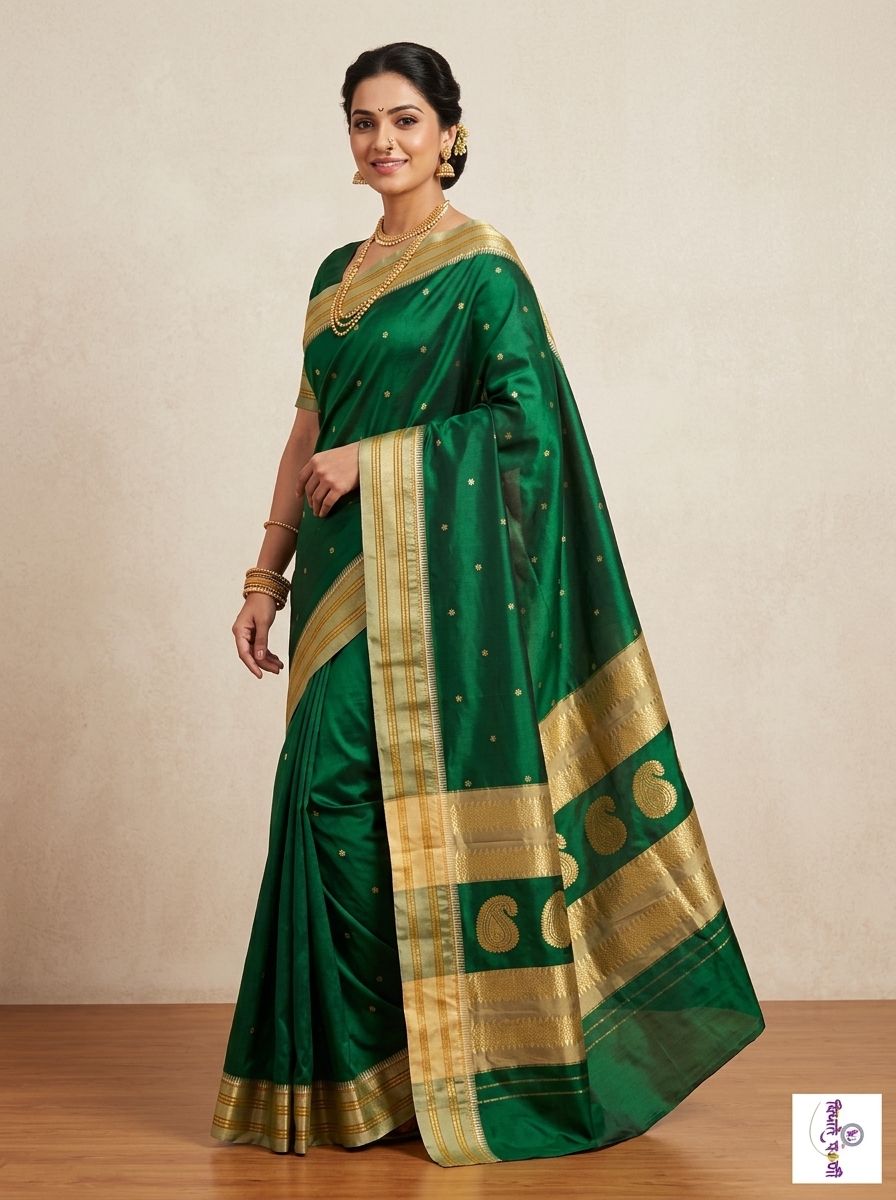
Model example from Textile Magic AI's guide. Compare the visible details with your original product photos.
What does a useful quality check look like?
Imagine you sell an emerald green saree with small gold flowers and a paisley pallu. This is an illustrative example, not a customer test or accuracy score.
Choose three clear spots: one flower on the body, one border section and one paisley on the pallu. Compare those spots first.
| Area | Reference detail | Reason to reject the output |
|---|---|---|
| Body | Small gold flowers | Flowers become large circles |
| Border | Several thin gold lines | Lines merge into one thick band |
| Pallu | Large paisley shapes | Paisleys change into leaves |
| Blouse | Plain green sleeves | Extra embroidery appears |
Then review the whole image. This stops a beautiful face or background from distracting you from the actual product.
If a detail is hidden in the reference, take another photo. Guessing is a weak starting point for a product catalogue.
For a wholesale collection, make a review sheet with the product code, image name and seven check boxes. Mark each detail as correct, unclear or wrong. If it is unclear, compare another reference. If it is wrong, keep that image out of the catalogue.
Before sending the catalogue to buyers, open it on a phone. Check that small borders remain visible and each photo appears under the correct product name on every page.
How can you prepare better references?
Use this routine for each new design:
- Take a clear photo of the saree body and pallu.
- Photograph the border closely enough to see its pattern.
- Add blouse photos when its cut or decoration matters.
- Use a clear model reference you have permission to use.
- Keep lighting steady and avoid filters.
- Save everything under one product code.
Start with one generated view and review it before creating a larger set. Textile Magic AI currently offers one to six poses, with 4:5 and 9:16 image options. Check the current credit packs before planning a large collection.
For other clothing categories, explore the separate AI fashion catalogue studio.
How should you publish your approved photos?
Use a full-length view to introduce the saree, followed by images that answer questions about the pallu, border and blouse. Keep real close-ups in the set.
For Shopify, follow its product media guidance when adding photos and videos.
For Google Shopping, review the current Merchant Center image requirements. Main product images must show the actual item clearly and avoid promotional overlays. Google also requires AI-generated images to carry metadata identifying their AI origin; preserve existing AI source tags.
Write alt text that describes what the image shows. For example: “Model wearing an emerald green saree with a gold border and paisley pallu.”
If you later use an approved photo in the AI video studio, check the moving result again. A correct starting image does not replace a video review.
Frequently asked questions
Can AI keep every saree detail exactly the same?
Do not assume that every output will be exact. Clear references help guide the result, but sellers should still compare colours, patterns and draping before publishing. This matters especially for detailed borders and heavily decorated sarees.
Should I replace all real product photos?
Keep useful real product photos. Model images show styling and drape, while original close-ups show the material you have in stock. Together, they help buyers see both the overall look and the smaller details.
What happens if Textile Magic AI makes a generation mistake?
Our generation-error promise is to return 100% of the credits used for the affected image. This means credits returned to your account, not a cash refund for the full credit pack. Contact support with the original photo, generated image and a clear description of the mistake.
What should you remember for your 2027 collection?
- Compare every AI image with the original saree.
- Check colour, border, pallu, blouse, fabric and drape.
- Review the full pose set before uploading it.
- Keep real close-ups and explain what the buyer receives.
- Replace images that change important product details.
Start with one saree from your next collection. Create your model photos with Textile Magic AI, use these seven checks and publish the images you have reviewed.
Your catalogue should help buyers understand your saree before they order.